Application for Bitrix24
Your WhatsApp inside Bitrix24 Open Channels
Your team replies in the same chat, CRM and queue it already uses. Photos, audio, documents, quotes and reactions go both ways, from the same number.
US$ 10 per number per month, all included 7-day free trial Pix
From QR code to first reply in three steps
All done by the administrator, inside Bitrix24. Your team stays where it already works.
-
Install
From the Bitrix24 Market, with an administrator account. WhatsApper CRM appears in the left menu.
-
Connect the number
Scan the QR code on the phone, in WhatsApp > Linked devices, or type on the phone the code the app shows.
Several numbers, one Open Channel each -
Reply
Choose a free Open Channel or create one. Messages arrive there, and replies go out from the same number.
Everything a conversation needs, inside Bitrix24
A single plan, with every feature on every number.
-
Complete conversations
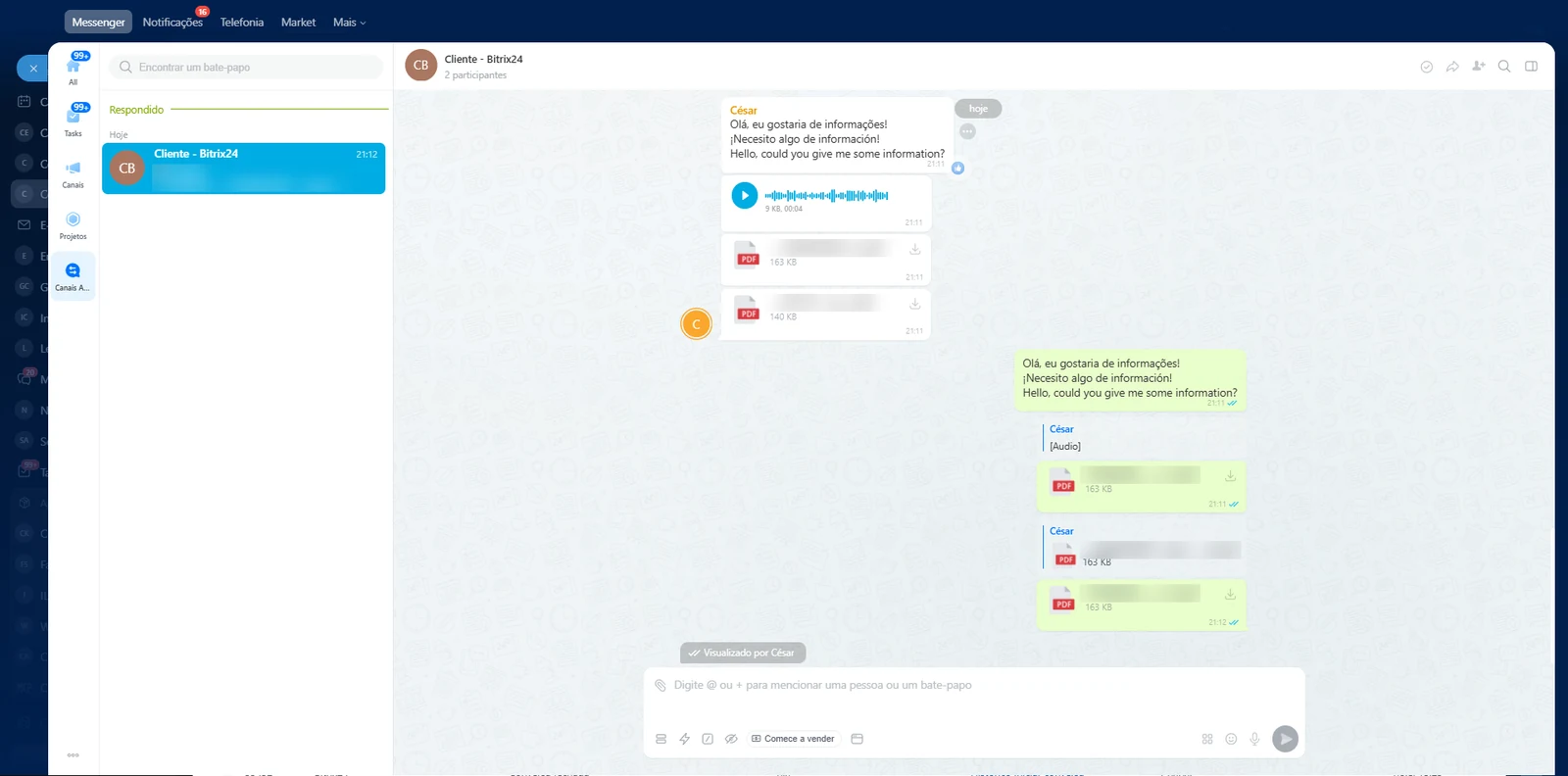
- Text, photos, videos, documents and audio, with captions, in both directions.
- Agent recordings reach the customer as WhatsApp voice messages.
- Quoted replies in both directions; customer reactions and missed calls arrive as notices.
- Customer edits marked as edited, messages typed on the phone, and "seen" when the customer reads.
-
Several numbers
- Each number is one connection, with its own Open Channel.
- Up to 20 numbers per company, all managed on one screen.
-
QR code or pairing code
- Connect by scanning the QR code on the phone, just like WhatsApp Web.
- Or, without a camera, by typing on the phone a code the app shows.
-
WhatsApp in the CRM
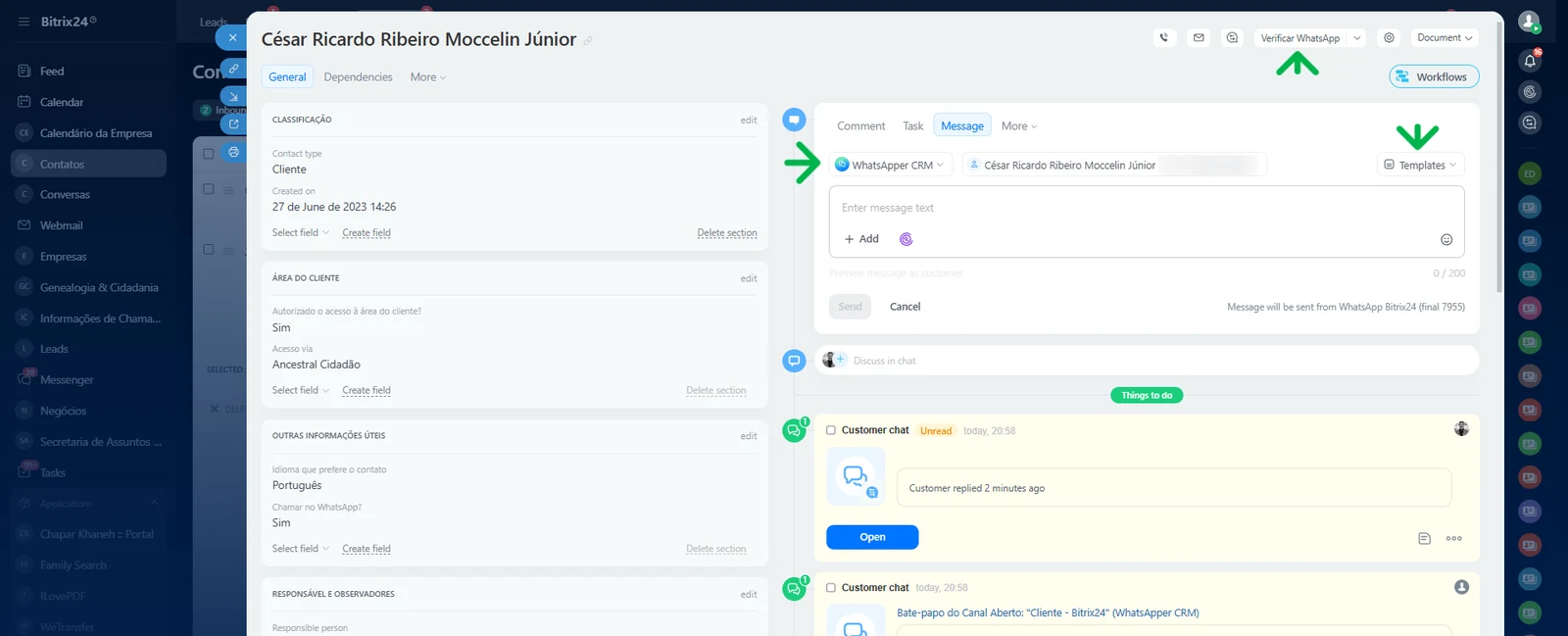
- Write first from the lead, contact, company or deal card: the conversation opens right away in the Open Channel, and the customer's reply arrives there.
- "Send message" and "Check number" automation rules for pipelines and business processes, the number in Marketing campaigns, and a "Check WhatsApp" button on the card.
- An agent's message from the card goes out right away; automation rules and campaigns follow a fixed, conservative pace, and sending stops at the first warning from WhatsApp.
-
Notices from the bot
- The "WhatsApper CRM" bot tells the administrator when a number disconnects.
- Vendor notices arrive in the Bitrix24 chat, not in a lost email.
-
Block list
- Messages from blocked numbers are discarded before anything is stored.
-
WhatsApp groups
- Turn on "Receive WhatsApp groups" for the number (off by default): each group becomes one conversation in the Open Channel.
- The name of the person who wrote appears before each message, and agents reply to the group.
- Participants' phone numbers are never stored or sent to Bitrix24.
See it in action
Real screenshots of WhatsApper CRM in Bitrix24.
One price. All included.
No tiers and no add-ons: everything on this page applies to every number.
US$ 10per WhatsApp number per month
- Every feature on every number, no other fees.
- 7-day free trial with 1 number, from the first installation.
- Monthly payment by Pix (Brazil's instant payment system) in the app screen, in reais at the Central Bank of Brazil PTAX selling rate plus 3%.
- Numbers added in the middle of the month are prorated until the single due date.
- Prefer a credit card, PayPal or another payment method? Contact support and we will arrange it with you.
Compare before you choose
What usually varies among WhatsApp connectors for Bitrix24.
| Feature | Us | Common market solutions |
|---|---|---|
| Agent voice as a WhatsApp voice message | On every number, no higher plan needed | Usually only in the most expensive plan |
| Quoted replies in both directions | Yes: from the customer to Bitrix24 and from the agent to WhatsApp | Not stated |
| Customer edits | Arrive as a new message marked as edited | Not stated |
| Pricing | A single price: US$ 10 per number per month, all included | Usually varies by plan, with features split by tier |
| Stored content | Only what delivery needs; files are not kept | Not stated |
Comparison with the public offers of other WhatsApp connectors for Bitrix24, checked in October 2026. "Not stated" means the public offer does not mention the feature.
Frequently asked questions
Is this the official WhatsApp API?
No. The app connects to WhatsApp the same way WhatsApp Web does and is not affiliated with WhatsApp or Meta. WhatsApp may restrict numbers it considers automated or abusive: do not use it for bulk or unsolicited messages.
Does the phone need to stay on?
Not all the time, but it must go online at least once every 14 days. Otherwise WhatsApp unlinks the device and the app asks for a new QR code.
Does it work with groups?
Yes, when the administrator turns on "Receive WhatsApp groups" for the number (off by default). Each group becomes one conversation in the Open Channel, with the name of the person who wrote before each message, and agents reply to the group (without a quote). WhatsApper does not send group phone numbers to the CRM, but depending on the CRM settings and the Open Channel's automatic messages, Bitrix24 may suggest records or reply to the group. Status updates, channels and broadcast lists are not delivered.
Which Bitrix24 plan do I need?
A plan with REST API and Market applications, with Open Channels, and an administrator account. For the automation rules, a plan with CRM automation rules.
Can writing first get the number banned?
Writing to people who never talked to the number is what most often gets numbers banned. That is why messages from automation rules and campaigns go out at a fixed, conservative pace, and all messages started from the CRM have a daily limit; you can only lower these limits, and the risk is not zero.
What if a payment is late?
The service pauses on the due date. Customer messages are kept and delivered once the payment is confirmed (photos, audio and files kept for more than 30 minutes arrive only as a notice), and the numbers stay connected.
Where is the data?
On a server in Brazil. Messages and files pass through it only to be delivered; files are not kept. Details are in the Privacy Policy.
Try it for 7 days, with 1 number.
Install from the Bitrix24 Market or ask us anything on WhatsApp.